Even after creating and organizing manuals, it is often the case that staff on the floor do not end up reading them.
Many people struggle with how to make it easier for users to find the manual they need.
The most common way users look for manuals is through folders, but in order to ensure users can properly find manuals, it is important to prepare not just one, but multiple access routes.
First, prepare devices that can be used to view manuals on the floor
Even if manuals are all available in Teachme Biz, they will not be used if there is no environment set up that allows staff to view them immediately when needed.
Especially in retail or food service, it is common for manuals to only be viewable on a single PC in the break room.
If situations continue where there is no device at hand when needed, or someone else is already using the device, the habit of referring to manuals will never take root.
If it is difficult to provide a device to every employee, simply preparing multiple shared devices can be effective.
Tablets and smartphones are portable, so lending them temporarily to employees or staff who especially need to read manuals, such as new hires, is also a recommended approach.
While cost is a factor, it is extremely important to first establish an environment where Teachme Biz can always be accessed easily, whether by setting up a network or implementing BYOD*.
*Bring Your Own Device: A practice where employees bring their own personal mobile devices to the workplace and use them for work purposes.
Once viewing devices are in place, work on improving access routes and utilizing features to make manuals easier to find.
There are multiple main access routes for viewing manuals
When viewing manuals, users access them through one or more of the following routes.
- Browsing through folders
- Browsing through a portal page
- Searching using the "Search" feature
- Receiving manuals delivered individually by an administrator via the distribution feature (viewers do not need to search)
- Finding manuals using other convenient features
Which route has the highest usage rate?
Among the multiple available routes, the one most commonly chosen by users is:
- Browsing through folders
Depending on company culture and folder structure, up to about 70% of users in some companies use this method to search.
※ This reflects the situation before the portal page feature was released in September 2023.
Therefore, it is recommended to first review and improve the "browsing through folders" route.
Browsing through folders
Properly organizing your folder structure is the most direct way to help users find manuals.
While folders are often divided by department, many users may also search by task category.
Is there room to improve by organizing folders and subfolders by task category or purpose?
On the other hand, reorganizing the folder structure takes considerable time and effort.
In addition, since folders are also the unit for assigning permissions such as viewer and editor roles, it can sometimes be difficult to create a structure optimized purely for searching.
If restructuring folders proves difficult, we recommend focusing on reviewing and improving other access routes instead.
Browsing through a portal page
Using a portal page, you can gather "the information you want to show, to the audience you want, in the order you want" all in one page.
While it takes some effort to plan and create the page structure, it is a very user-friendly route for viewers.
Since there is no need to change the folder structure, no changes to permission settings or management systems are required either.
If you already know "which users should see which manuals," please make use of the portal page feature.
Searching using the "Search" feature
One approach that requires minimal time and cost is using the search feature to find and view manuals.
Once mastered, it is extremely convenient, and once users become accustomed to it, they will tend to search for manuals rather than navigating through folders.
Benefits of making search a habit
The benefit of establishing a habit of searching is that it dramatically reduces the time it takes to reach the manual you need.
However, there are surprisingly many people who say "I've never searched before so I don't use it" or "I'm not comfortable with searching so I avoid it."
How to make searching a habit
At first, it is important to provide careful support, such as setting aside time to explain how to search or helping users search together until they become comfortable.
During the creation stage, it is important for manual creators to carefully craft titles and descriptions so that manuals appear properly in search results. Adding search tags thoroughly is also effective.
In addition, there are various search methods, such as "search across all manuals" or "search within a folder."
By promoting these search methods with reference to the manuals below and making it easier for users to find what they need, the habit of "searching" will gradually take hold.
How to improve searchability
By reviewing the search logs in Teachme Biz, you can understand what search terms users are using and whether they were able to find the manual they needed as a result.
By repeatedly having the experience of finding manuals through search, users will develop the habit of turning to Teachme Biz when they need help.
For details on how to use search tags, please refer to the article below.
Receiving manuals delivered individually by an administrator via the distribution feature
In addition to users searching for manuals themselves, administrators can also distribute and notify users of manuals directly.
Use the "Task Distribution Feature" to send one-time task requests with manuals attached
The task distribution feature allows you to send manuals to users as task requests.
For example:
- Sending a manual on how to fill out submission forms with a deadline of the end of the month
- Sending a manual for a new recipe or product information with a review deadline of the end of the week
- Requesting urgent updates to computers or tools
and many other scenarios.
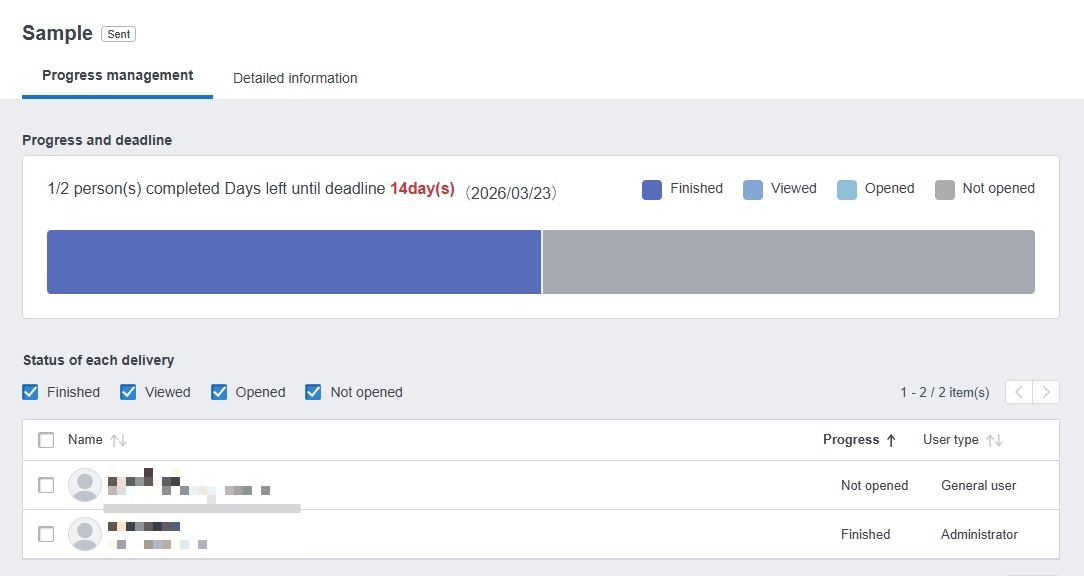
The task distribution feature not only distributes manuals but also allows you to track users' task completion status.
To improve task completion rates, you can also select only users who have not yet completed the task and redistribute it to them.
If you have never used the task feature, we encourage you to give it a try.
Use the "Training Feature" to learn tasks in advance
The training feature allows you to compile and distribute the manuals employees need to learn as a course.
For example:
- A course on customer service tasks for new hires
- A course on tasks for managers and supervisors such as store managers
- A course for tasks involving complex equipment with many functions to learn
and many other use cases can be imagined.
We also actually operate online training using the training feature at our own company.
With the training feature, you can check progress after sending a course, making it useful for new employee training and follow-up education.
In addition, since distributed courses can be viewed at any time, they can also be used for reviewing completed content.
※ The training feature is available on the Basic plan and above.
Finding manuals using other convenient features
In addition to folders, search, and distribution features, there are other convenient features that help users find the manuals they need when they need them.
Accessing manuals via "QR Code"
Teachme Biz has a feature that converts a manual's URL into a QR code.
By printing QR codes as stickers with a printer and placing them in the relevant locations, users can access the manual directly just by scanning the QR code with a smartphone or similar device.
For example:
- How to use the projector in a meeting room
- How to replace the toner in the copier
- How to perform maintenance on machinery
By placing QR codes near machines and equipment, users can immediately check how to operate them.
Mipox Corporation, one of our users, has also worked on creating manual access routes using QR codes.
Searching via "New Manuals," "Recently Viewed Manuals," and "Bookmarks"
Teachme Biz has features that allow users to check manuals they have recently viewed and to bookmark manuals.
By having users take advantage of these features, it becomes easier for each user to access the manuals they use frequently.
Additionally, "New Manuals" allows users to view manuals that have been newly published within the past two weeks.
Informing users about these features can often further encourage the use of Teachme Biz.
Start by understanding the situation of your users
We have introduced a variety of measures, but the most important thing is to first understand the current state of your users and implement measures that are suited to that situation.
Teachme Biz also has a report feature for analyzing viewing status, so make use of it to check usage and then work on improvements.
Try creating a manual with Teachme Biz!