Even when manuals are created and maintained, they often go unread on the front lines.
Many people struggle with how to make it easier for users to find the manuals they need.
The most common way users look for manuals is through folders, but in order to ensure users can properly find manuals, it is important to prepare not just one, but a variety of access routes.
First, prepare devices for viewing manuals on-site
Even if manuals are all available in Teachme Biz, they won't be used if there is no environment where users can easily view them whenever they need to.
Especially in retail or food service industries, it is quite common that manuals can only be viewed on a single PC in the break room.
If people repeatedly find themselves without a device when they need one, or find that someone else is already using it, the habit of consulting manuals will never take hold.
If providing a device to every employee is difficult, simply preparing multiple shared devices can still be effective.
Since tablets and smartphones are portable, a practical approach is to temporarily lend them to employees or staff who especially need to read the manuals, such as new hires.
While cost is a factor, it is extremely important to first create an environment where Teachme Biz can be accessed easily at any time—whether by setting up a network or implementing BYOD*.
*Bring Your Own Device: A practice where employees bring their personally owned mobile devices to the workplace and use them for work purposes.
Once viewing devices are in place, work on improving navigation flows and leveraging features to make manuals easier to find.
There are multiple main routes for viewing manuals
When accessing manuals, users typically find them through one or more of the following routes.
- Navigating through folders
- Navigating through the portal page
- Searching with the "Search" feature
- Receiving a manual distributed individually by an administrator (the viewer does not search)
- Finding manuals using other convenient features
Which route do users use most?
Among the multiple routes available, the one users tend to use most is:
- Navigating through folders
Depending on company culture and folder structure, up to about 70% of users in some organizations use this method to find manuals.
※ This reflects the situation before the portal page feature was released in September 2023.
Therefore, it is recommended to first review and improve the "navigating through folders" route.
Navigating through folders
Organizing your folder structure properly is the most direct path to helping users find manuals.
Folders are often divided by department when created, but many users prefer to search by business category.
Is there room for improvement, such as organizing folders and subfolders by business category or use case?
On the other hand, restructuring folders requires considerable time and effort.
Additionally, since folders are also the unit for assigning permissions such as viewer and editor roles, there are cases where it is difficult to design a structure solely optimized for "findability."
If restructuring the folder layout is too difficult, it is recommended to focus on reviewing and improving other access routes instead.
Navigating through the portal page
Using the portal page, you can bring together "the information you want to show, to the audience you want to show it to, in the order you want to show it"—all on one page.
It takes some effort to plan the page structure and create the content, but it is an extremely user-friendly route for viewers.
Since there is no need to change the folder structure, no changes to permission settings or management practices are required either.
If you already know "which people should see which manuals," please make use of the portal page feature.
Searching with the "Search" feature
One approach that requires minimal time and cost is using the search feature to find and view manuals.
Once users become proficient with it, it is extremely convenient—and they will start searching for manuals rather than navigating through folders.
Benefits of establishing a search habit
The key benefit of encouraging a search habit is that it dramatically reduces the time it takes to find a manual.
However, there are surprisingly many people who say, "I've never searched before, so I don't use it," or "I'm not comfortable with searching, so I avoid it."
How to establish a search habit
At first, it is important to provide careful support—such as setting aside time to explain how to search, or searching together with users until they get comfortable with it.
At the creation stage, it is important for manual authors to craft titles and descriptions carefully so that manuals appear in search results. It is also effective to make sure search tags are properly assigned.
In addition, there are various ways to search, such as "search across all manuals" or "search within a folder."
By promoting search methods using the manuals below and making it easier for users to find what they need, the habit of "searching" will gradually take hold.
How to improve search effectiveness
By reviewing the search logs in Teachme Biz, you can understand what keywords users are searching for and whether they were able to find the manuals they needed as a result.
Each time a user successfully finds a manual through search, it builds the habit of turning to Teachme Biz whenever they encounter a problem.
For details on how to use search tags effectively, please refer to the article below.
Receiving manuals distributed individually by an administrator
Rather than having users search for manuals themselves, administrators can also distribute and notify users of manuals directly.
Use the "Task Distribution" feature to send one-time task requests with manuals attached
The task distribution feature allows you to send manuals to users as implementation requests.
For example:
- Send a manual on how to fill out a submission form with a due date within the current month
- Send a manual on a new recipe or product information with a review deadline within the current week
- Request an urgent update for a computer or tool
It can be used in a wide variety of situations like these.
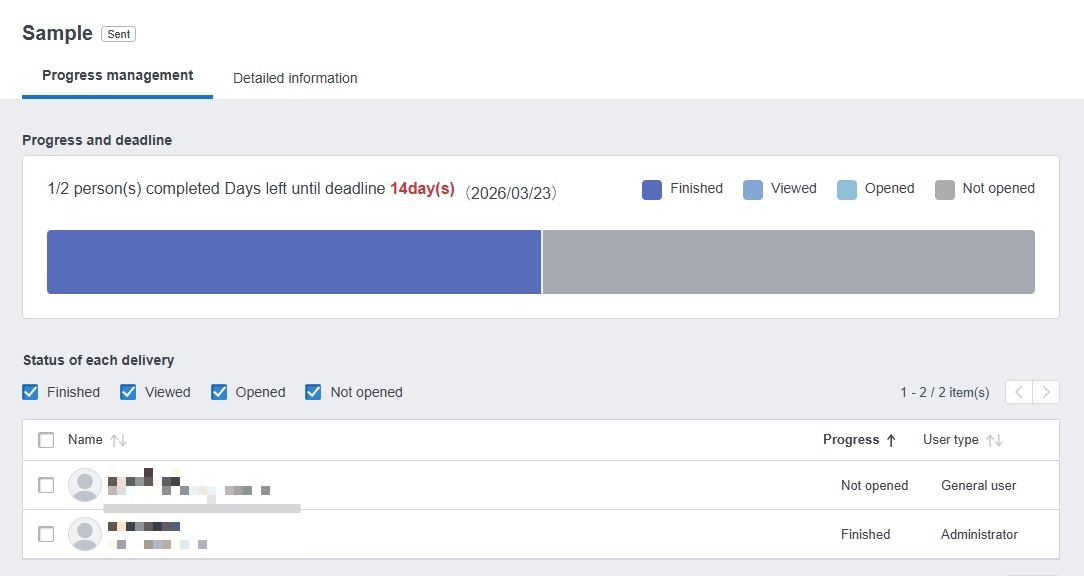
The task distribution feature not only lets you distribute manuals, but also allows you to track each user's task completion status.
To improve task completion rates, you can select only users who have not yet completed a task and redistribute it to them.
If you have never used the task feature before, please give it a try.
Use the "Training" feature to learn job tasks in advance
The training feature allows you to compile and distribute the manuals that employees need to learn as a course.
For example:
- A course on customer service procedures for new employees
- A course on duties for store managers and other supervisors
- A course covering tasks that involve a wide range of knowledge, such as operating equipment with many functions
Many different use cases can be imagined here as well.
We also run our own internal online training program using the training feature.
With the training feature, you can check the progress status after sending a course, making it useful for onboarding new employees and providing follow-up training.
Additionally, since distributed courses can be viewed at any time, they can also be used for reviewing completed content.
※ The training feature is available on the Basic plan or higher.
Finding manuals using other convenient features
In addition to folders, search, and distribution features, there are other convenient features that help users find the manuals they need when they need them.
Access via "QR Code"
Teachme Biz has a feature that converts a manual's URL into a QR code.
By printing QR codes as stickers on a printer and placing them in the relevant locations, users can access a manual directly simply by scanning the QR code with a smartphone or similar device.
For example:
· How to use the projector in the conference room
· How to replace the toner in the copier
· How to perform machine maintenance
By placing QR codes near machines and equipment like these, users can instantly look up operating instructions.
Mipox Corporation, one of our users, has also worked on creating manual navigation paths using QR codes.
Browsing from "New Manuals," "Recently Viewed Manuals," and "Bookmarks"
Teachme Biz includes features that allow users to check manuals they have recently viewed and to bookmark manuals.
By encouraging users to utilize these features, they can more easily access the manuals they use most frequently.
Additionally, "New Manuals" allows users to view manuals that have been newly published within the past two weeks.
Letting users know about these features often leads to a significant increase in Teachme Biz usage.
Start by understanding the current state of your users
We have introduced a variety of approaches, but the most important thing is to first understand the current situation of your users and implement the measures that best fit their needs.
Teachme Biz also includes a report feature for analyzing viewing activity, so use it to check usage patterns before working on improvements.
\ Try creating a manual in Teachme Biz! /