What is a Portal Page?
Portal pages allow you to consolidate manuals related to your work into a single page.
Related: Tell me about portal pages
https://help.teachme.jp/hc/en-us/articles/21838465421593
This article provides examples of how to create portal pages.
Page Creation Process and Key Points
Consider solutions to your problems
Start by clarifying your current situation and desired outcome, then evaluate whether a portal page is the right solution for bridging the gap.
The main development purposes of the portal page feature are as follows:
- Make it easier for viewers to reach manuals
- Allow consolidated display of information outside of Teachme Biz that is needed for work
Depending on your current situation and desired outcome, there may be other things to address first, or a different approach may be more suitable.
Examples where something else should be addressed first
- The viewing environment is not in place
→ It is effective to set up the viewing environment, such as by increasing the number of devices. - The necessary manuals are not yet available
→ Create the missing manuals. - Teachme Biz has not been adopted yet
→ We recommend creating and promoting killer content.
Related: [Useful Resource] Examples of Killer Content to Create Early in Your Teachme Biz Implementation
https://help.teachme.jp/hc/en-us/articles/9316280679449
Examples where a different approach is more suitable
- Viewers cannot tell which manual contains the information they need
→ Rename manual titles from the viewer's perspective - Folders and manuals that are not relevant are displayed, making it hard to search
→ Grant only the necessary permissions based on role or job area
Related: Is there an efficient way to configure permissions when staff turnover occurs?
https://help.teachme.jp/hc/en-us/articles/900005508926
Clarify your intended use
Making a "generic page for everyone" will result in the need to search through the page and its manuals, ultimately making it just as hard to find what you need.
We recommend clarifying your intended use and deciding on the structure before you start creating.
Planning example: Logistics industry
| Who | - Warehouse line workers (assigned to different lines each day) |
| In what situation | - When unsure during work - Pre-review before working on a line they haven't used in a while |
| What information | - Attendance rules - General warehouse rules - Line-specific procedures - Packaging methods - Shipping methods - Roles by position |
| What device | - Individually issued smartphones |
| How to access the page | - Access via the "Portal" menu in the mobile app - For error-prone or critical tasks, post the portal page name at the work site or on tools with a note saying "Check before starting work" |
Planning example: Retail industry
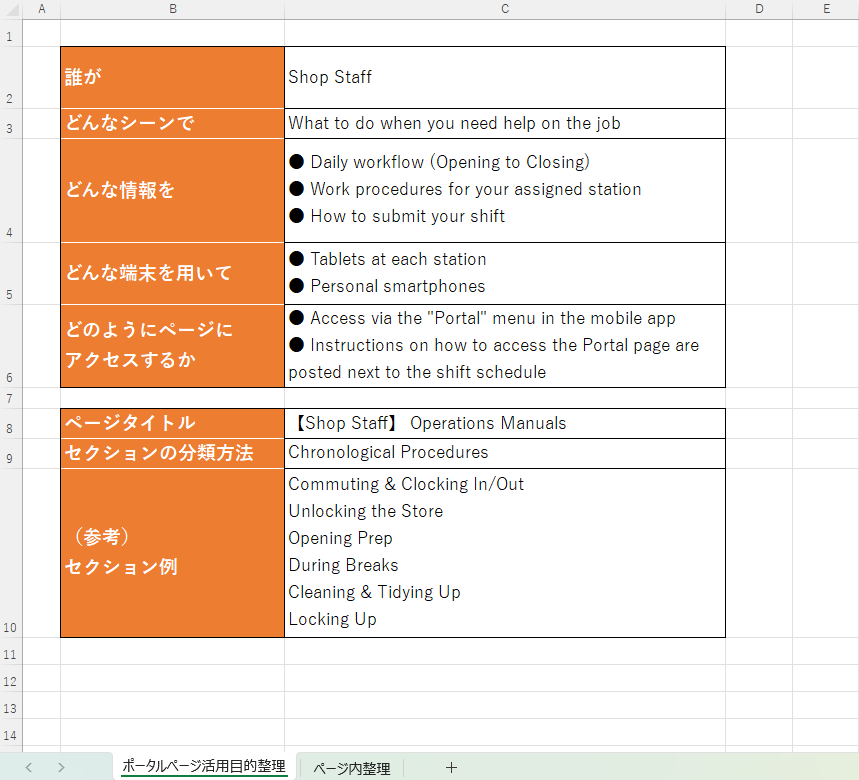
| Who | - Store staff |
| In what situation | - When encountering difficulties during work |
| What information | - Opening to closing workflow - Work procedures for their assigned station - How to submit shift requests |
| What device | - Tablets assigned to each station - Personal smartphones |
| How to access the page | - Access via the "Portal" menu in the mobile app - Post an image showing how to access the portal page next to the shift schedule |
Planning example: Food service industry
| Who | - Kitchen staff |
| In what situation | - When unsure about a menu item or recipe - When a new menu item is added |
| What information | - Standard menu recipes - Seasonal menu recipes - Location-exclusive menu recipes |
| What device | - One tablet per kitchen |
| How to access the page | - Access via the "Portal" menu in the mobile app - Post an image showing how to access the portal page in the break room |
Plan your structure
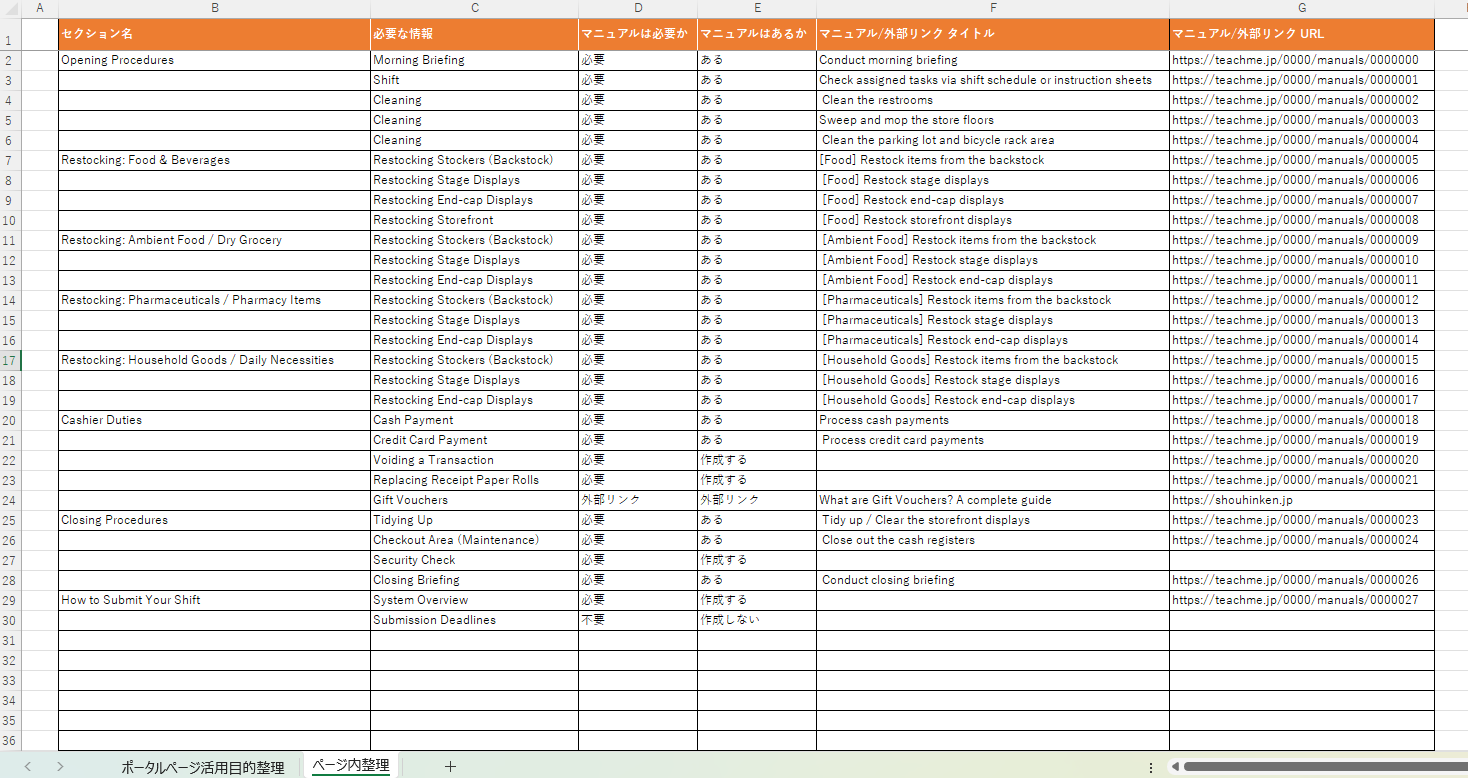
If you want to include a lot of information on your page, we recommend listing everything out in Excel or a similar tool before building it in Teachme Biz.
Recommended steps
- Decide on the unit for each page
- Decide on the unit for each section
- Write out an overview of the information needed
- Map existing manuals to each page and section
- Create any missing manuals
Please also make use of the "Organization Sheet" to help with your planning.
Organization Sheet (clicking this will download an Excel file to your device)
https://teachme-biz-lp.s3.ap-northeast-1.amazonaws.com/assets/files/cs/Teachme+Biz_portal_seirisheet.xlsx
Related: Export manual list (Web Browser)
https://teachme.jp/8/manuals/5619046
Create your page
Rather than aiming for a "perfect" first release, it is more efficient to publish once you have a reasonably useful set of content, then continue to improve it together with your viewers.
Tips for creation
■ Do not overload a single page with too many sections or pieces of content
- Number of sections per page: up to 10
- Number of content items per section: up to 12
■ Verify viewing permissions for manuals
Check that the target users are members of the folder where the manuals you want to show them are stored.
Related: Add or remove users from folder (Web Browser)
https://teachme.jp/8/manuals/4929449
Setting up permissions using "Teams" makes it easier to review and update them.
Related: Manage user teams (Web Browser)
https://teachme.jp/8/manuals/4929282
■ Update manual cover images to match the work they represent
Before

After

Related: Replace/Delete Registered Images and Videos (Web Browser Version)
https://teachme.jp/8/manuals/8080589
■ Arrange pages in the order most useful to viewers
Pages are displayed in alphabetical/title order in the portal page "list" view.
If needed, add a prefix to page titles to control the sort order.
Related: Sort folders and manuals
https://help.teachme.jp/hc/en-us/articles/900006675383
Announce the launch
It is important to communicate clearly to staff through leaders, ideally in real-time settings such as morning meetings or regular team meetings.
- When operations will begin
- How you want them to use it
- Which devices to use
- How to navigate to the page
- Conducting a demo
Key Points at Launch
Clearly communicate navigation instructions to viewers
It defeats the purpose if the page you created to improve discoverability is unknown to viewers or takes effort to find.
Create an environment where viewers can easily access the portal page.
- For PC users: Instruct them to bookmark the page in their browser
※ A QR code export feature for portal pages is planned for the future, which will allow access via mobile devices.
Set up and communicate a reporting process for missing content or permissions
If content or permissions are missing, the page you worked hard to create will not be able to reach its full potential.
It is effective to prepare a manual outlining the reporting process for when "needed content is missing" or "content is not displayed," and place it at the top of the page.

Schedule regular review cycles
Pages, like manuals, become outdated over time.
To prevent the situation where people stop using the page because it no longer reflects reality, we recommend deciding in advance when and how reviews will take place.
Gather feedback from viewers
It is difficult to create a perfect page for viewers right from the start.
Collect feedback from the field through surveys and other means, update the page as needed, and continue to develop it into a page that is truly useful to your team.
We recommend doing this not only at the initial launch, but also regularly at each scheduled review cycle.
Closing
We offer portal page implementation support services and consulting services tailored to your organization's needs.
If you would like to schedule an online meeting, please feel free to contact your dedicated representative or reach out via our inquiry form.
Related Links
Create and edit Portal Pages (Web Browser)
https://teachme.jp/8/manuals/24198884
[Usage Examples] Portal Pages | How to Make the Most of Manuals in the Workplace
https://help.teachme.jp/hc/en-us/articles/22749574246169
Track user viewing activity to measure effectiveness and drive improvements
https://help.teachme.jp/hc/en-us/articles/900005732566