This article is intended for those who already have a general understanding of "what the Training feature can do" and are considering "how to actually use the Training feature in practice."
We hope you will take away some hints on how to structure your courses when using the Training feature to educate employees and staff.
If you are not yet familiar with the Training feature, please check out the release announcement article!
The Key Is to Divide Courses by "Tasks Learners Will Be Able to Perform After Completing the Course"
To get straight to the point, we recommend structuring your training courses and deciding on units based on "the unit of tasks that learners will be able to perform after completing the course."
"The unit of tasks that learners will be able to perform after completing the course" means a unit in which, by taking that course, a person becomes able to perform one specific task within their overall range of duties.
Since abstract descriptions can be difficult to understand, we will explain with concrete examples.
A Case Study from Our Customer Support Team
We also use training courses at our own company to educate new hires and mid-career employees. Here, we will introduce a case study from our customer support team.
First, the overall duties of our customer support team mainly include the following tasks.
- Responding to customer inquiries
- Creating and updating online manuals
- Creating and updating FAQs
- Handling announcements for feature releases and system issues
We have created and are running courses like the ones shown in the image below so that new employees can learn these tasks.
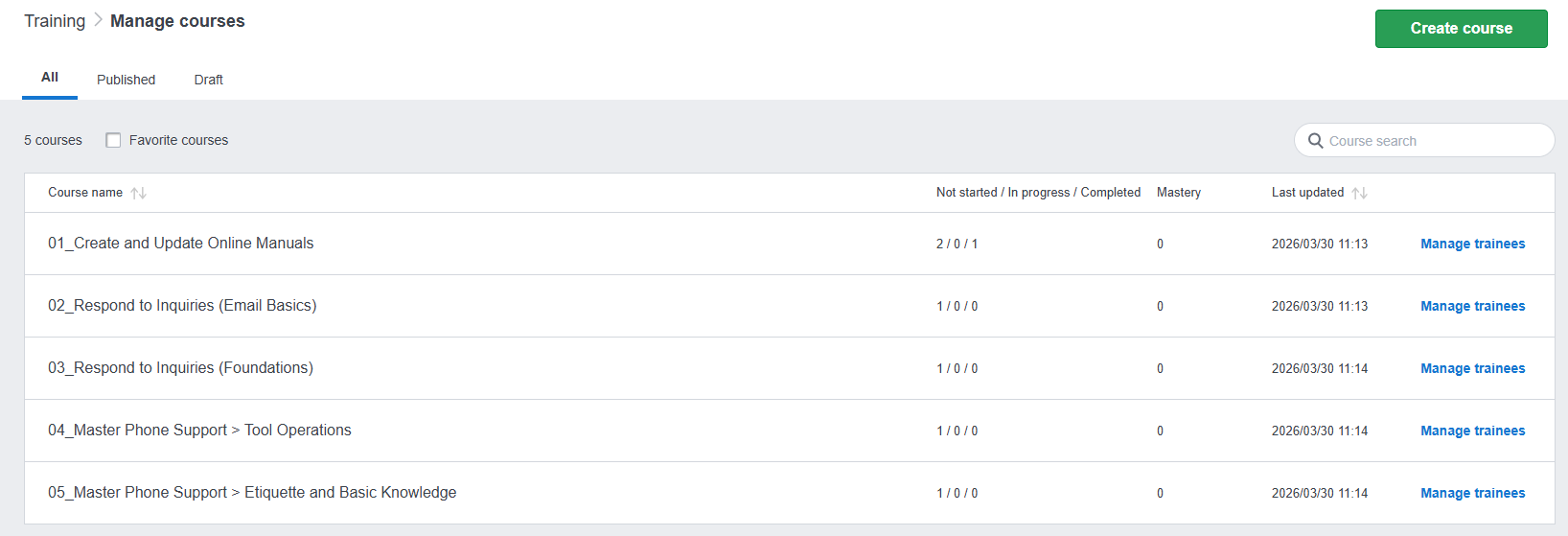
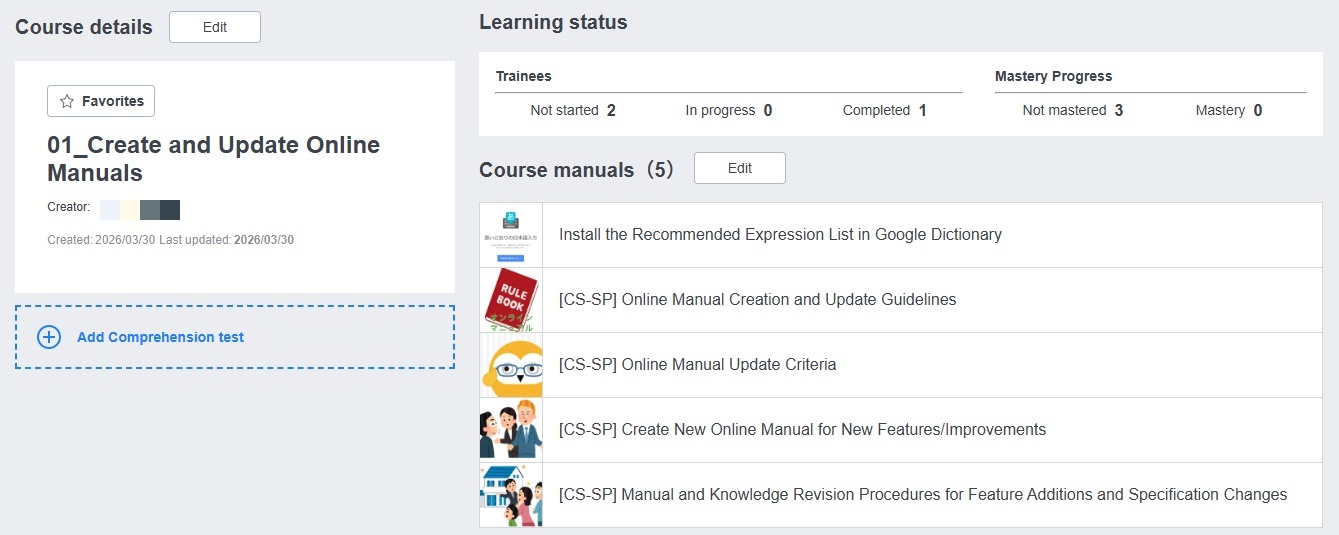
For example, by taking the course on "Creating and Updating Online Manuals," learners can reach a state where, among all their duties, they are able to handle the task of creating and updating online manuals.
This makes it possible to operate in a way where "even though they cannot yet handle inquiry response tasks, they can already be entrusted with creating and updating online manuals."
Also, even within "responding to customer inquiries," there are often many sub-tasks that need to be learned, such as the following.
- How to handle inquiries via email
- How to handle inquiries via phone
- How to submit investigation requests to the development team
- How to use the systems utilized in inquiry operations
If all of these tasks are bundled into a single course, the number of manuals within that course inevitably becomes quite large, raising the learning barrier for participants and taking a long time before they can fully cover all inquiry-related tasks — making it difficult to start putting things into practice in the field.
In such cases, it is best to divide the course into segments that one person can independently handle, and distribute them accordingly.
In our own case, we divide courses into units such as "Basic Inquiry Handling Process," "How to Handle Inquiries via Email," and "How to Handle Inquiries via Phone," and operate in a way where learners first become capable of independently handling email inquiries, and then learn phone inquiry handling as the next step.
Case Study: An Example of How to Divide Courses in a Supermarket
Let's apply what we've covered so far and think about what kinds of courses would work well in other industries.
This time, we used supermarket store operations as an example.
In a supermarket, general staff tasks include things like "customer service," "cash handling," "product management," "floor management," and "purchasing management."
Rather than simply grouping these under something like "Basic Floor Management Tasks," it is better to divide the floor management-related duties as follows and create multiple courses.
- "Learning how to organize displayed products"
- "Learning how to clean the sales floor"
- "Learning how to conduct physical inventory"
Also, if shifts are organized by time of day and there are distinct groups of tasks for each time slot, you may also want to distribute courses structured like the following:
- "Pre-opening preparation"
- "Tasks from opening until 4:00 PM"
- "Tasks from 4:00 PM until closing"
- "Post-closing tasks"
This is another recommended approach for organizing and distributing courses.

Dividing Courses Helps Learners Feel Their Skills Growing
A common example of how courses get divided is bundling everything into a single course by role, such as "General Tasks Related to Customer Support Operations."
Consolidating everything into one course has the advantage of making it clear and easy to understand — "once you complete this one course, you've covered all the tasks needed to work independently."
On the other hand, there are also many disadvantages to bundling everything together. For example, in the customer support case, these include the following.
- It is difficult for the training manager to keep track of which tasks (manuals) within the course each learner has already completed.
- Learners find it hard to feel a sense of accomplishment for mastering individual tasks — such as "Creating and Updating Online Manuals" — within the overall scope of work.
- When a learner wants to review a specific task like "Creating and Updating Online Manuals" at a later date, they have to search for it among unrelated manuals.
By dividing courses into units based on the tasks learners will be able to perform after completion, these disadvantages can be eliminated.
In particular, when learning new tasks, having a tangible sense of skill growth makes the process more enjoyable, which in turn makes absorbing new information more effective — so we highly recommend this approach.
What Are the Benefits for Training Managers and Learners?
Finally, let's summarize the benefits of dividing courses by task for both training managers and learners.
Training Managers
- You can segment and distribute tasks in the order you want learners to prioritize. (You can set a completion deadline for each course.)
- It is easy to see which tasks each learner has already studied.
- You can prioritize assigning practical work based on tasks the learner has already studied.
- You can use the courses a learner has completed as a basis for deciding which course to distribute next.
- When the content of a specific course is revised, it is easy to redistribute that course.
Learners
- You can break down the tasks you need to learn and focus on them one at a time.
- It is easy to see how you have grown through completing a course (what you have become capable of doing), which helps with motivation.
- When you want to review only a specific task you haven't performed in a while among your studied tasks, it is easy to look it up again.
What did you think? As you can see, by making effective use of courses, you can carry out employee training in a highly effective way.
We also have an article on how to make use of the Trainer role in the Training feature. Please feel free to take a look.