Creating a manual isn't just about documentation—it's about ensuring readers can understand it properly.
Even if you have a "correct" manual, if readers can't understand the methods and perform their tasks when viewing it, the manual isn't fulfilling its purpose.
In this article, we'll introduce common mistakes in manuals and basic points on how to transform them into easy-to-understand documentation.
Three Key Points for Easy-to-Understand Manuals
There are three basic common points that make manuals easy to understand.
- Clear key points and important notes
- Simple structure with appropriate amount of information
- Proper use of images, videos, and text according to purpose
By keeping these points in mind, people viewing your manuals will more easily understand their content.

While "accurate content" is certainly important, the essence of a good manual is to "communicate correctly" so that it can be "read and understood in a short time" and "reproduced easily."
Now, let's look at examples of manuals that don't follow these points and see how they can be improved.
[Poor Example 1] Images or videos are simply pasted/key points are not described
Why is this a problem?
Information intended to be conveyed through images or videos isn't immediately clear.
While having images makes it easier to understand the situation, simply pasting images without context makes it difficult to grasp the key points that need to be emphasized, resulting in a manual that isn't reproducible.
How to improve?
Use marking and video editing to show viewers what they should focus on from their perspective.
For example, points like these:
- For documents or system screens, include checkpoints for data entry or operations
- For actions, highlight key movements or things to be careful about
Also, including supplementary information such as working time and ideal state in the description provides helpful references during work.
[Poor Example 2] Multiple tasks are crammed into one manual
Content for users (location of supplies) and content for administrators (ordering methods, steps 5-9) are mixed in a single manual
Why is this a problem?
It becomes difficult to find specific information when users want to check just part of a process.
Let's say there's a manual for cashier operations. Even a simple cashier process includes multiple tasks such as scanning products and handling money. These steps are often crammed into a single manual. With additional considerations like electronic payments and smartphone app coupons, there's a lot to remember.
When users need to reference only the parts they're unsure about during work, finding the specific information becomes challenging.
How to improve?
If a single manual contains content for multiple operations, consider whether it could be divided into separate manuals.
Here, let's think of operations as combinations of "processes," "tasks," and "actions."
In manufacturing, there's a method called IE (Industrial Engineering) that analyzes operations by dividing them into these three categories to improve operations.
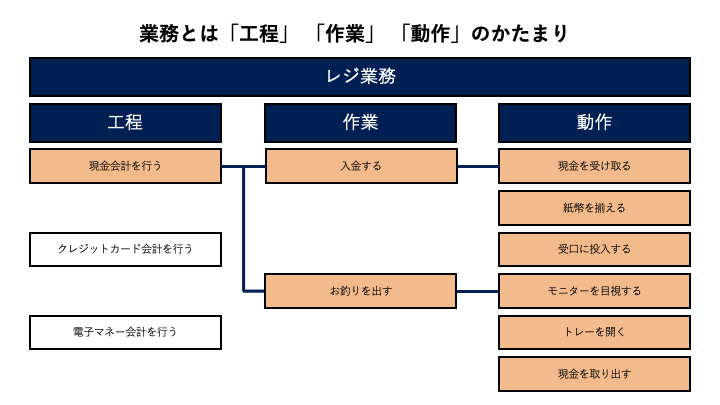
In most cases, manuals are created for each "operation" or "task." Creating steps for each "action" within those "tasks" results in more understandable manuals.
Instead of creating one manual labeled "Cashier Operations," create manuals for each "process" such as "Cash Payment Method" or "Credit Card Payment Method."
By creating manuals at the "process" level, you'll have about 15-20 steps per manual, making it easier for users to find what they're looking for.
If a process includes complex tasks (with many actions), consider creating separate manuals for those "tasks" as well.
When dividing operations into multiple manuals this way, you can:
- Organize them in folders/subfolders
- Create an index manual using related manual links
This approach makes manuals easier to find.
[Poor Example 3] Creating manuals with videos only
Why is this a problem?: Videos have strengths and weaknesses, so they should be used selectively
Videos are great for showing movement, making them useful for first-time tasks where understanding the sequence of actions is important. However, when users need to find specific information, they have to search through the entire video. It's important to understand the characteristics of both videos and still images to use them appropriately.
▽Videos
・Strengths: Can express flow of movement, speed, and audio
・Weaknesses: Users need to search for relevant sections when checking specific steps/long videos can be burdensome for viewers
▽Still Images
・Strengths: Clearly show work procedures/easy to review
・Weaknesses: Information is fragmented, making it difficult to grasp the task as a continuous process
As shown in the manual below, creating videos only for steps where detailed movements are important makes for a more understandable manual.
【Sample】How to Make Dashi (Japanese Soup Stock)
ーーーーーーー
Getting started is also important.
In this article, we've introduced three key points for creating easy-to-understand manuals:
- Clear key points and important notes
- Simple structure with appropriate amount of information
- Proper use of images, videos, and text according to purpose
However, you don't need to focus on all these points from the very beginning.
To maintain momentum in creation, one approach is to first create the manual intuitively, then use these points as a checklist when making revisions.
Reading through your manual from the viewer's perspective often reveals areas for improvement that you might not have noticed.
Please consider incorporating these tips into your company's manual creation guidelines.
\Let's create manuals with Teachme Biz!/