A manual only delivers value when it reaches its users
You put thought and time into creating your manual. Creating it is a good start, but if you have no way of knowing whether the manual is actually being viewed, you cannot tell whether users are properly making use of it. A manual only begins to deliver value once it reaches its users.
To encourage users to make the most of your manuals, it is essential to first understand how they are being viewed.
Understanding viewing status is the first step toward measuring effectiveness and making appropriate improvements
Let's look at what becomes possible once you understand viewing status, from three perspectives: "administrators, creators, and decision-makers."
1. Benefits for administrators: Ability to track changes in user behavior
By checking which manuals have been viewed by whom, and how often (or how rarely) they are being viewed, you can identify factors affecting manual effectiveness and explore potential countermeasures.
2. Benefits for creators: Increased motivation to create manuals
Creators invest significant time in producing manuals. Being able to see the impact of their work in concrete numbers provides motivation when creating or revising manuals. Quantifying the results also makes it easier to justify and secure the time needed for creation.
3. Benefits for decision-makers: Ability to make informed decisions about renewing the Teachme Biz contract
After implementing Teachme Biz, there will come a time when you need to report usage status to decision-makers. By consistently monitoring viewing status and working to embed the tool in daily operations, renewal decisions can be made appropriately and smoothly.
As illustrated above, visualizing "viewing status" as a KPI is extremely important for determining whether manuals are being actively used. Conversely, no matter how excellent a manual is, it cannot be effective if it is not being viewed.
Let's now look at specific ways to understand viewing status.
3 ways to understand viewing status
1. Use "Reports" to get a broad overview of viewing trends at the overall or folder level
Using the "Reports" feature in Teachme Biz, you can check the trend of views across all folders, or by individual folder, for a selected time period.
You can check how to use this feature here.
For example, by looking at daily view counts like this, you can establish a baseline for daily views.
The above is an actual example from our company. With approximately 100 users, we can estimate that the number of views per person per day was around 8 in March and around 10 in April.
In the early stages after implementing Teachme Biz, you can easily track adoption trends on a daily or weekly basis.
If more than six months have passed since implementation, looking at monthly view trends over a one-year period allows you to identify increases or decreases in views and confirm whether a culture of reading manuals on Teachme Biz is taking hold over the medium to long term.
As shown above, stable or increasing view counts are a positive sign, but a declining trend in views is a warning signal.
The above analysis is done using "all folders," but if you have folders organized by type of work or department, you can use "folder selection" to understand viewing status for each one individually.
Looking at the folders for our Customer Success and Sales departments, you can see that the level of adoption and utilization differs between them.
If you are developing manuals for a specific folder (department or business function), you can easily check the adoption status using this approach.
2. Use CSV export of manuals to check viewing status at the individual manual level
By exporting the manual list as a CSV, you can check the total number of views for each manual as well as the number of views over the last 1 month, 3 months, 6 months, and 1 year.
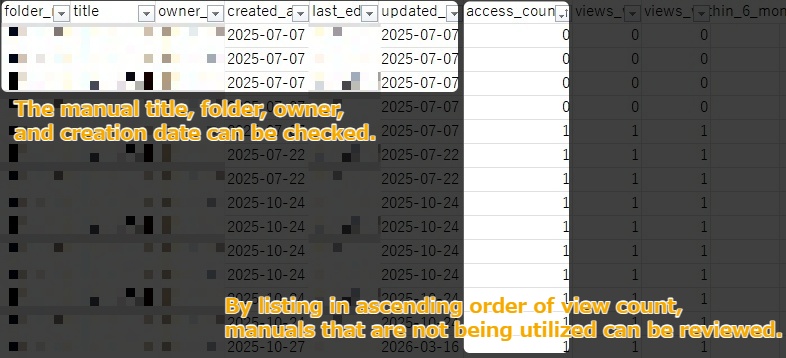
For example, as shown in the image above, you can use the manual list CSV to extract manuals with low view counts.
If a manual that was created several months ago has a low view count, it may not be actively used by end users in the field.
* Note, however, that even if a manual has relatively fewer views compared to others, it may still be considered actively used if the number of its intended viewers or the frequency of its use is inherently low.
You can also perform various types of analysis by using Excel functions.
3. Check the viewing status of individual manuals
In Teachme Biz, you can also view the view trend for individual manuals*.
By looking at the trend in views for each manual, you can measure how well newly created or updated manuals are being adopted.
Especially in the early stages of implementation, it is important to cultivate the habit of reading manuals on Teachme Biz.
A highly effective strategy for building the habit of reading manuals on Teachme Biz is to create "killer content."
Killer content refers to content with strong appeal that drives adoption in a specific area.
In this context, that means manuals expected to be viewed by a large number of people or viewed frequently serve as killer content for promoting adoption of Teachme Biz.
Manuals likely to be viewed by many people include, for example, manuals covering tasks that a large number of employees carry out.
By tracking the growth in views of killer content, you can confirm whether the habit of reading manuals on Teachme Biz is taking hold.
For example, at our company, one such manual is "How to Apply for Domestic Business Travel."
Employees who visit clients, such as sales staff, need to submit an application and file expenses each time they go on a domestic business trip.
Since the fields to fill in on the application vary depending on the frequency of travel and the type of trip, employees tend to refer to the manual more often to verify what to enter.
As shown in the image above, you can measure adoption by looking at the trend in views for each manual.
Even if views are not progressing as hoped, you can use the data to make an informed decision on whether to implement improvement measures.
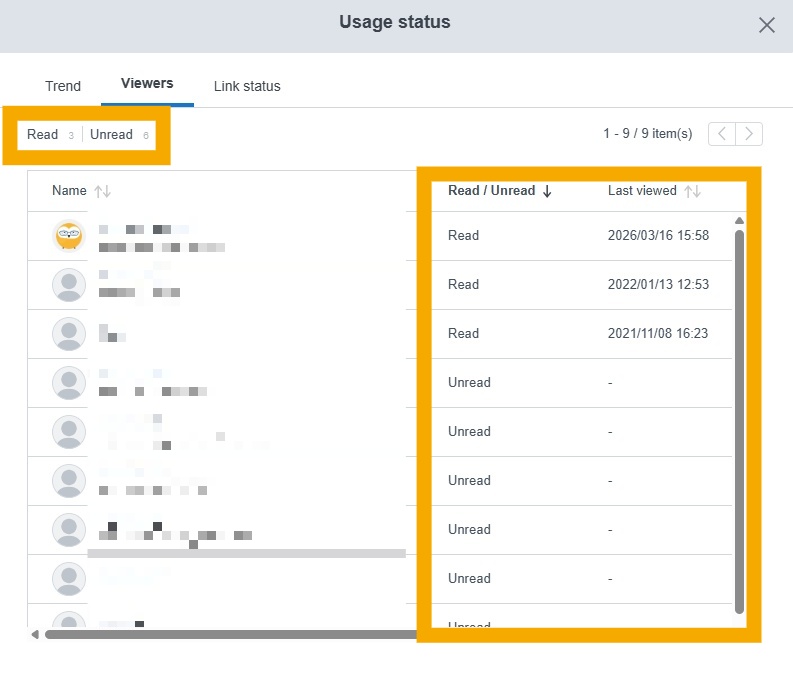
This report lets you check the unread/read status and the date and time of each user's last view, which can be used as a reference when reaching out individually to users who have not yet viewed the manual.
When views of manuals covering "tasks with a large number of intended viewers and high frequency of use" increase, the habit of reading manuals on Teachme Biz becomes more firmly established.
Next steps after understanding viewing status
Gain an understanding of the current state of utilization and take action to promote greater use of your manuals.
Identify the factors behind viewing patterns
Conduct interviews with both frequent and infrequent viewers. If there are many users, try interviewing a few people from the highest and lowest viewing frequency groups.
[Sample interview questions for frequent viewers]
- In what kinds of situations do you most often use the manuals?
- Has using the manuals been beneficial in any way?
- Have you experienced any difficulties when using the manuals?
[Sample interview questions for infrequent viewers]
- Do you know how to access and view the manuals?
- Are you aware that there are manuals relevant to your role?
- Can you picture what kinds of situations you would use the manuals in?
For frequent viewers, it is helpful to hear specific stories about how they use the manuals, as this makes it easier to understand the practical benefits.
By asking about any difficulties they have encountered, you can also gather knowledge on how to overcome those challenges if others face similar issues.
For infrequent viewers, the goal is to pinpoint where the problem (or bottleneck) lies. Is it about knowing how to access the manuals, not being aware that the manuals exist, or is there a disconnect between the intended purpose of the manuals and the users' understanding? Work to identify the root cause.
Consider and implement countermeasures
Once interviews are complete, use the insights gathered to consider appropriate countermeasures.
Using the infrequent viewer interview topics as examples:
Do you know how to access and view the manuals?
→ If users do not know or are unsure how to view the manuals, share guidance on how to log in and how to find manuals. It is also important to set up an environment that makes it easy to view manuals as part of daily work. Check whether users have access to a device and internet connection to consult manuals when needed.
Are you aware that there are manuals relevant to your role?
→ Users who are unaware of a manual's existence will not think to look for it. There are two main approaches to address this.
First, create opportunities to share the manuals you have created. Sharing them helps align awareness and understanding among team members.
Second, incorporate the QR codes or URLs of your manuals into the natural flow of work. Placing them in visible locations encourages users to check them, even if they were not previously aware of them.
Can you picture what kinds of situations you would use the manuals in?
→ If users cannot visualize how to use the manuals, share examples of how frequent viewers are putting them to use. Seeing how someone close to them is actually using the manuals helps users understand the purpose and value of doing so.
Summary
Understanding viewing status and confirming that the manuals you have created are reaching the people who need them is key to driving sustained adoption and embedding manuals into everyday practice.
To improve viewing rates, it is also a good idea to proactively create opportunities to share the benefits of using manuals, based on your own firsthand experience and insights gathered through interviews.