The following causes are possible.
Logged Out without performing "Save draft", "Release", or "Update"
Draft data for which "Save draft", "Release", or "Update" has not been performed is retained only on the device and will be deleted upon Log Out.
In addition, Teachme Biz is designed so that the session expires at the configured Expiration Date (※), requiring you to log in again.
Please perform "Save draft" or "Release"/"Update" before you Log Out.
※ You can choose from 12 hours, 3 days, 7 days, 30 days, or 90 days. The default setting is 7 days.
Related:
Create and edit manual (iOS version)
https://teachme.jp/8/manuals/3204679/
Create and edit manual (Android version)
https://teachme.jp/8/manuals/3204850
Tell me about Session Management
https://help.teachme.jp/hc/en-us/articles/900006443883
Data was synced incorrectly when a conflict occurred
Since the mobile app allows you to create and edit Manuals even offline, data conflicts with the server may occur.
If an operation is performed incorrectly during data synchronization after a conflict, there is a possibility that the Manual may be overwritten with unintended data.
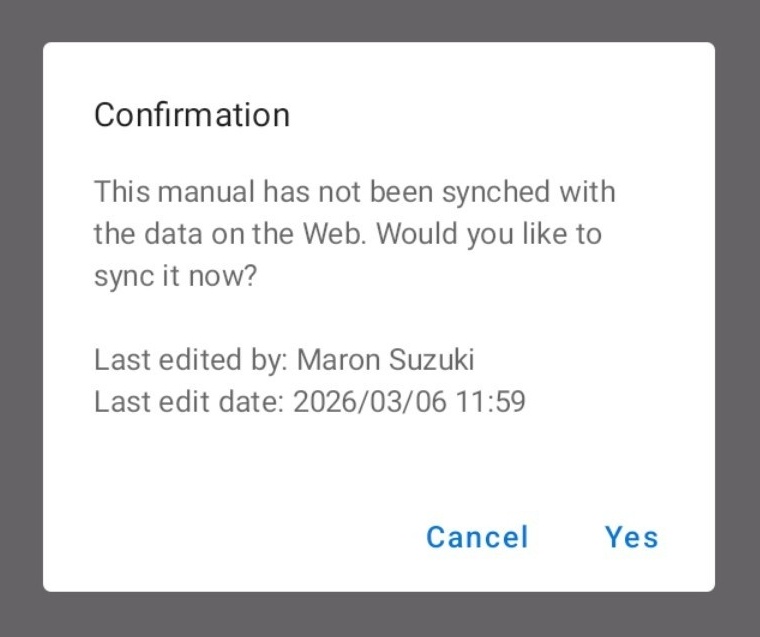
If a Message like the one above is displayed during a sync operation, always confirm whether you want to keep the "data on the device (local data)" or the "data on the server", and sync by referring to the following.
Tell me about "Unsynced" in the mobile app
https://help.teachme.jp/hc/en-us/articles/12095601263769
Checking the Manual content on a different device from the one used for editing
When checking edited content on a different device from the one used for editing, you need to save the data to the server even if it is the same account.
Please perform "Save draft" on the device where editing was done, sync on the other device, and confirm that the edited content is displayed.
Related: Synchronize with the server (Mobile App)
https://teachme.jp/8/manuals/10717036/
Multiple people edited a single Manual at the same time
When multiple people edit a single Manual at the same time, the content of the person who edited last (in terms of time) will be reflected.
As a result, there may be cases where your edited content is not reflected.
Please check whether others are editing at the same time.
Logged into multiple devices with the same account
While one account can be used on multiple devices (smartphones, tablets, computers, etc.), simultaneous use is not intended.
If the number of devices accessing the account exceeds a certain limit, devices with older access history will be forcibly logged out in order, and any content being edited may be lost.
Please reduce the number of devices accessing the account and perform your editing.
Related:
Is there a limit to the number of devices that can be used?
Maximum number of connections per account
Tell me about the precautions when sharing an account among multiple people
https://help.teachme.jp/hc/en-us/articles/4411464955673