A manual only delivers value when it reaches its users
You've created a manual with purpose and effort. But even if the manual has been created, if you have no way of knowing whether it's actually being viewed, you can't tell whether users are properly making use of it. A manual only delivers its true value once it reaches its users.
To encourage users to make active use of manuals, it is important to first understand the viewing status.
Understanding viewing status enables effective measurement and appropriate improvement
Let's look at what becomes possible once you understand viewing status, from three perspectives: "administrators, creators, and decision-makers."
1. Benefits for administrators: Ability to track changes in user behavior
By checking which manuals have been viewed by whom, and how frequently (or infrequently) they are being viewed, you can identify the factors affecting manual effectiveness and consider appropriate measures for improvement.
2. Benefits for creators: Increased motivation to create manuals
Creators invest time in building manuals. Being able to see the impact of their work in measurable numbers provides motivation when creating or revising manuals. Presenting results in concrete figures also makes it easier to secure the time needed for the creation process.
3. Benefits for decision-makers: Ability to make informed decisions about renewing the Teachme Biz contract
After implementing Teachme Biz, a time will come when you need to report usage status to decision-makers. By regularly monitoring viewing status and working to embed the tool in day-to-day operations, renewal decisions can be made appropriately and smoothly.
As illustrated above, when assessing whether manuals are being actively used, it is extremely important to visualize "viewing status" as a KPI. Conversely, no matter how good a manual is, it cannot deliver results if it is not being viewed.
Now let's look at specific ways to understand viewing status.
3 methods for understanding viewing status
1. Use "Reports" to get a broad overview of viewing trends across the entire organization or by folder
Using the "Reports" feature in Teachme Biz, you can check the trend of views across all folders or broken down by individual folder for a selected period of time.
You can find instructions on how to use this feature here.
For example, by looking at daily view counts like this, you can establish a baseline for daily views.
The above is an actual example from our company. With approximately 100 users, we can estimate that the average number of views per person per day was about 8 in March and about 10 in April.
In the early stages after implementing Teachme Biz, you can easily track daily and weekly trends to gauge how well the tool is taking root.
If more than six months have passed since implementation, looking at the monthly view trends over the course of a year allows you to identify increases or decreases in view counts and assess whether a culture of viewing manuals in Teachme Biz is becoming established over the medium to long term.
If view counts are stable or increasing as shown above, there is no cause for concern. However, a declining trend in views is a warning sign.
The above analysis uses "All Folders," but if your folders are organized by type of work or department, you can use "Select Folder" to check viewing status individually.
Looking at the folders for our Customer Success team and Sales team, you can see that the level of adoption and utilization differs between the two.
If you are developing manuals for a specific folder (department or function), you can easily check the adoption status using this approach.
2. Export manuals as CSV to check viewing status per manual
By exporting the manual list as a CSV, you can check the total number of views for each manual, as well as view counts for the past 1 month, 3 months, 6 months, and 1 year.
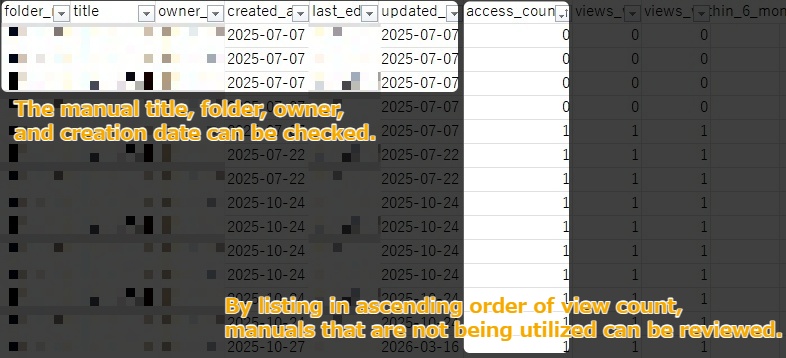
For example, as shown in the image above, you can use the manual list CSV to identify manuals with low view counts.
If a manual has had few views despite being created several months ago, there is a possibility that it is not being used by people on the ground.
- Note: Even if a manual has relatively fewer views compared to others, it may still be considered actively used if the absolute number of intended viewers or the expected viewing frequency for that manual is inherently low.
You can also use Excel functions to perform a variety of additional analyses.
3. Check the viewing status of individual manuals
In Teachme Biz, you can also view the trend of views for individual manuals*.
By tracking the view trend for each manual, you can measure how well a newly created or updated manual is being adopted.
Especially in the early stages of implementation, it is important to establish the habit of viewing manuals in Teachme Biz.
A highly effective strategy for building the habit of viewing manuals in Teachme Biz is to create "killer content."
Killer content refers to content that has strong draw, created to drive the widespread adoption of a particular area.
In other words, in this context,
manuals that are expected to be viewed by a large number of people or viewed frequently serve as killer content for driving the adoption of a specific area (Teachme Biz).
Manuals with a high number of viewers include, for example, manuals covering tasks that many employees perform.
By monitoring the growth in views of killer content, you can confirm whether the habit of viewing manuals in Teachme Biz is taking root.
For example, in our company, this would be the manual "How to Apply for Domestic Business Travel."
Employees who visit clients, such as sales staff, need to file applications and expense claims each time they go on a domestic business trip.
Because the fields required for the application vary depending on the frequency of travel and the type of trip, employees tend to refer to the manual frequently to confirm what information to enter.
As shown in the image above, viewing the trend of views for each manual allows you to measure the degree of adoption.
Even if viewership is not progressing, you can use the data to make an informed decision on whether to implement improvement measures.
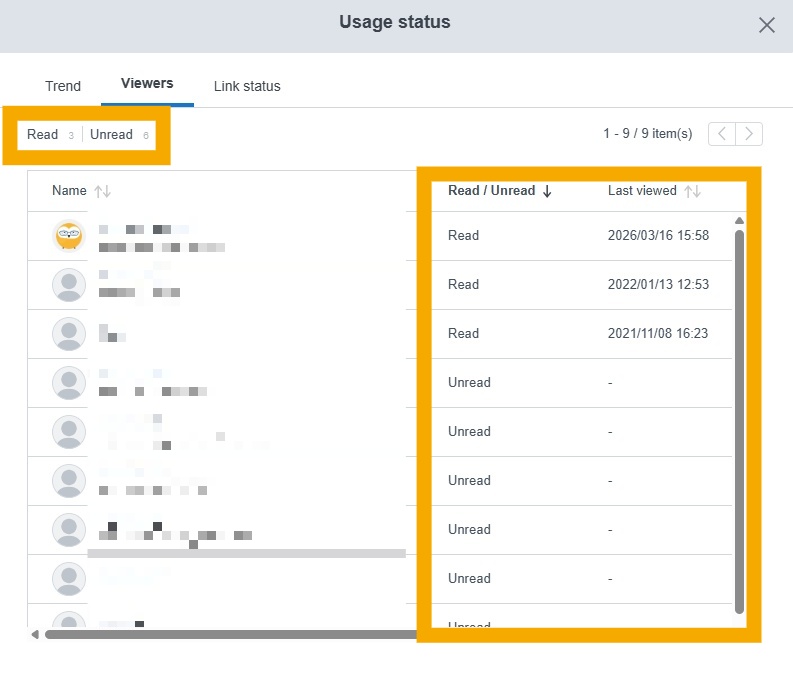
This report lets you check each user's read/unread status and the date and time of their last view, making it a useful reference for reaching out individually to users who have not yet viewed the manual.
When views increase for manuals covering "tasks with a large number of intended viewers and high viewing frequency," the habit of viewing manuals in Teachme Biz becomes more firmly established.
Next steps after understanding viewing status
Understand the current state of utilization and take action to promote greater use of manuals.
Identify the factors behind viewing status
Conduct interviews with both frequent and infrequent viewers. If the number of people is large, try interviewing a few individuals from the highest and lowest frequency groups.
[Example interview questions for frequent viewers]
- In what situations do you most often use manuals?
- Have there been times when using a manual was particularly helpful?
- Have you encountered any difficulties when using a manual?
[Example interview questions for infrequent viewers]
- Do you know how to access and view manuals?
- Are you aware that there are manuals relevant to your role?
- Can you picture specific situations in which you would use a manual?
For frequent viewers, interviewing them about specific situations in which they use manuals makes it easier to confirm the practical benefits of utilization.
Additionally, asking about difficulties they have encountered allows you to accumulate knowledge about how to overcome those challenges, which can be shared as best practices.
For infrequent viewers, focus on pinpointing where the issue (or bottleneck) lies. Is it the viewing method? Are they unaware that the manuals exist? Or is there a disconnect between the intended purpose of the manuals and the users' own understanding? Work to identify the root cause.
Develop and implement countermeasures
Once interviews are complete, consider countermeasures based on the findings.
Taking the interview questions for infrequent viewers as an example:
Do they know how to access and view manuals?
→ If they don't know or are unsure how to view manuals, share guidance on how to log in and how to search for manuals. It is also important to ensure that the environment supports regular viewing as part of their daily workflow. Confirm that the devices and internet access needed to view manuals when questions arise are available.
Are they aware that there are manuals relevant to their role?
→ If users don't know a manual exists, they won't think to look for it. There are two main approaches to address this.
First, create opportunities to share the manuals you have created. Sharing them helps align awareness and understanding among team members.
Second, incorporate QR codes or URLs for manuals into the natural flow of the relevant tasks. Placing them where people can easily see them encourages users to check the manual even if they weren't previously aware of it.
Can they picture specific situations in which they would use a manual?
→ If users have no clear picture of when to use manuals, try sharing examples of how frequent viewers are using them. Helping users understand the purpose and value of manuals through real-life examples from people around them is key to encouraging adoption.
Summary
Keeping track of viewing status and confirming that the manuals you have created are properly reaching those who need them will lead to the widespread adoption and establishment of manual utilization.
In order to improve viewing status, it is a good idea to actively create opportunities to share the benefits of manual utilization based on your own firsthand experiences and gathered feedback.