Notes
This article covers the following features.
▼ Create a manual from a PDF File directly (Web Browser)
https://teachme.jp/8/manuals/15051766
▼ Import PDF File as Step into Existing Manual (Web Browser)
https://teachme.jp/8/manuals/42025008
If generation fails with "Generate Manual Draft from PDF," please refer to the following article.
▼ "Failed to generate manual from PDF." is displayed. What should I do?
https://help.teachme.jp/hc/en-us/articles/40185453308313
Related: Tell me about Teachme AI's "Generate Manual Draft from PDF" feature
https://help.teachme.jp/hc/en-us/articles/40748838040985
When attempting to import a PDF through an unsupported method
In the manual editing screen, you cannot import a PDF by clicking "Select File" on an empty step or by dragging and dropping it.
Error message: "An invalid file was selected. Please make sure the file type is one of the following."
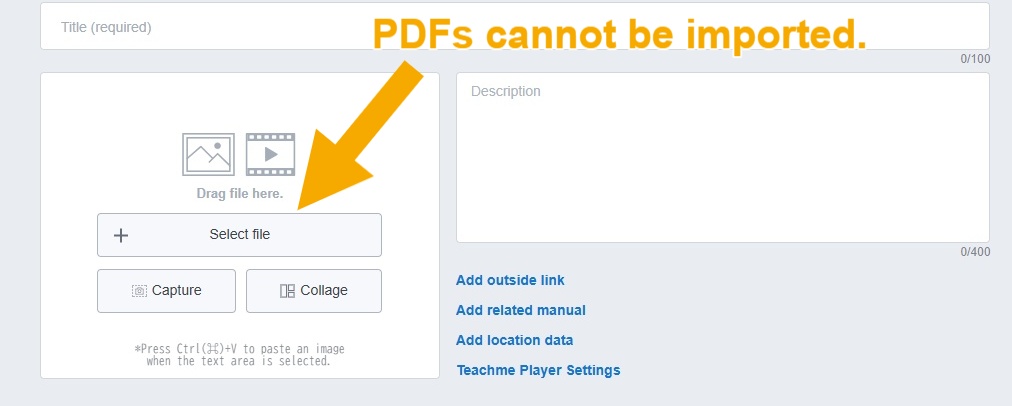
Please import using one of the following methods.
Adding a new manual via "▽" next to "Create New Manual" on the list screen > "Create Manual from PDF"
By clicking "▽" next to "Create New Manual" on the list screen and selecting "Create Manual from PDF," you can create a new manual with an imported PDF.
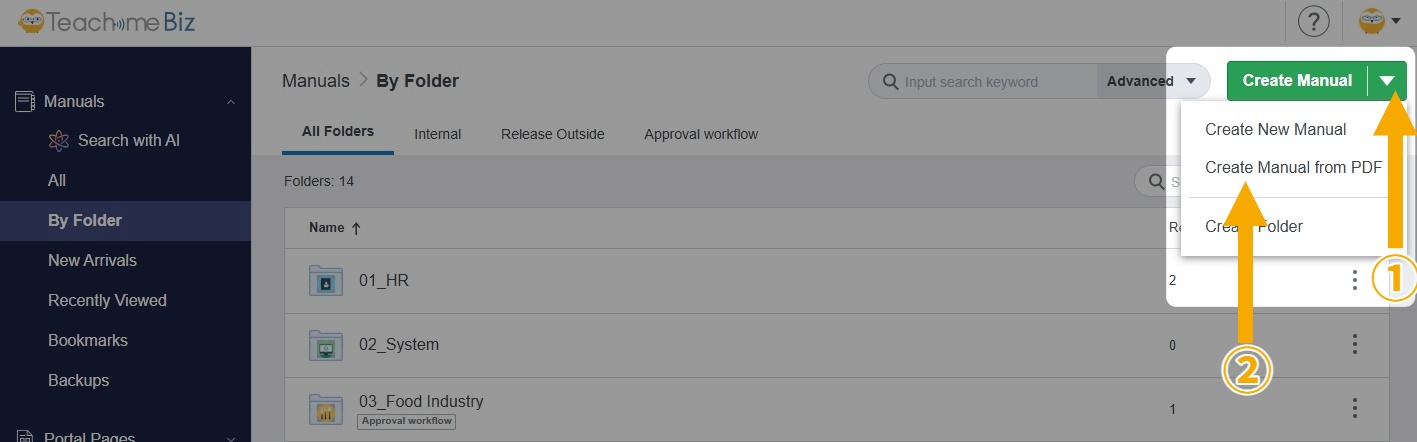
Related: Create a manual from a PDF File directly (Web Browser)
https://teachme.jp/8/manuals/15051766/
Adding from the manual editing screen via "Add Step" > "Add from File" > "PDF"
By clicking "Add Step" > "Add from File" > "PDF" in the manual editing screen, you can import a PDF starting from the middle of an existing manual.
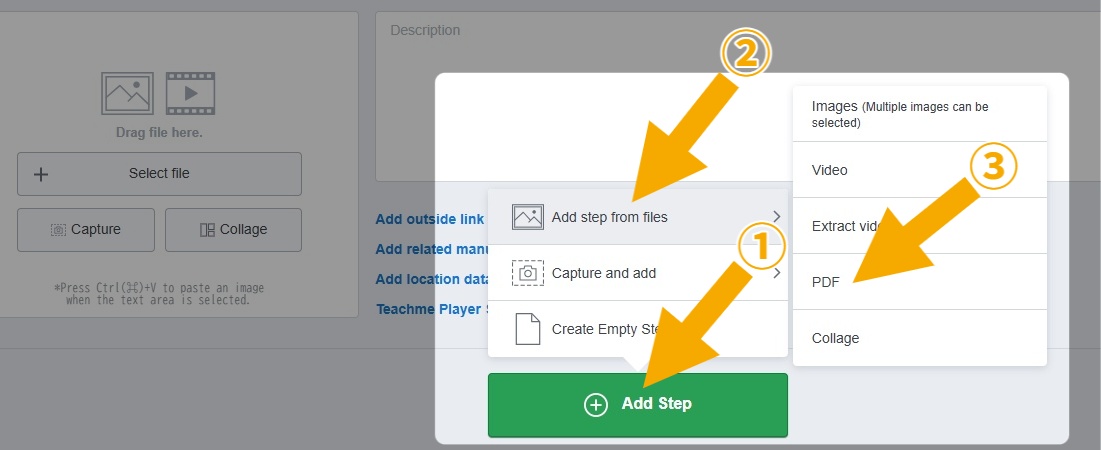
Related: Import PDF File as Step into Existing Manual (Web Browser)
https://teachme.jp/8/manuals/42025008/
When the PDF does not meet the requirements
There are the following restrictions on PDFs that can be imported.
Total size: Up to 50MB
Number of pages: Up to 51 pages including the cover page
If the PDF you want to import exceeds these limits, please split or edit the PDF so that it falls within the limits before importing.
If you still cannot import
If you have checked all of the above and still cannot import the PDF, please prepare the following information and contact our support team.
- Teachme Biz account information
…Please provide your email address or account name - The date and time when the import failed
- A screenshot showing the issue with the import
- The relevant PDF file
For inquiries regarding this matter (Japan, Thailand, Vietnam)
■Studist Japan
Use the Contact Form for inquiries regarding this matter.
Email: support@teachme.jp
■Studist Thailand
Email: support-global@teachme.jp
LINE Official Account: @studist.th
Scan this QR Code
Or add a friend via LINE ID: @studist.th (Please make sure to include the "@" symbol)
■Studist Vietnam
Please contact us at support-vn@teachme.jp.