There are two methods available.
Please use them according to the situation you need.
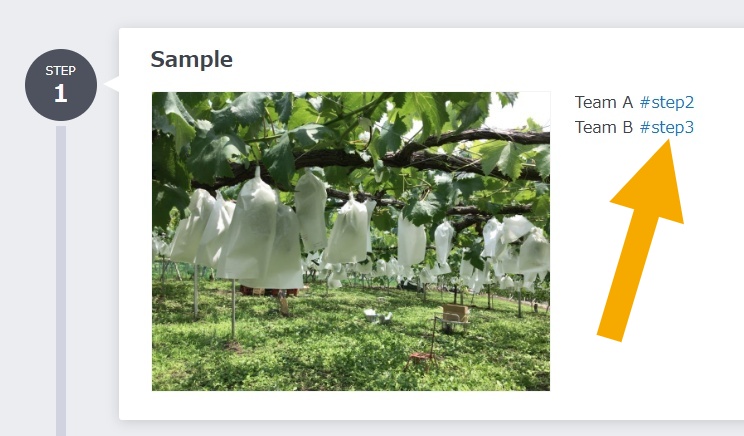
Navigate to a specific step within the same manual
By entering "#step[number of the step you want to jump to]" in the description, you can add a link that jumps to a specific step within the same manual.
This is useful when you want to direct viewers to a specific step, such as when a procedure branches.
※If the step number changes due to manual editing, it will not follow automatically, and clicking the link will jump to the step with the corresponding number.
▼Put a link to the steps in the description (Web Browser)
https://teachme.jp/8/manuals/24160977
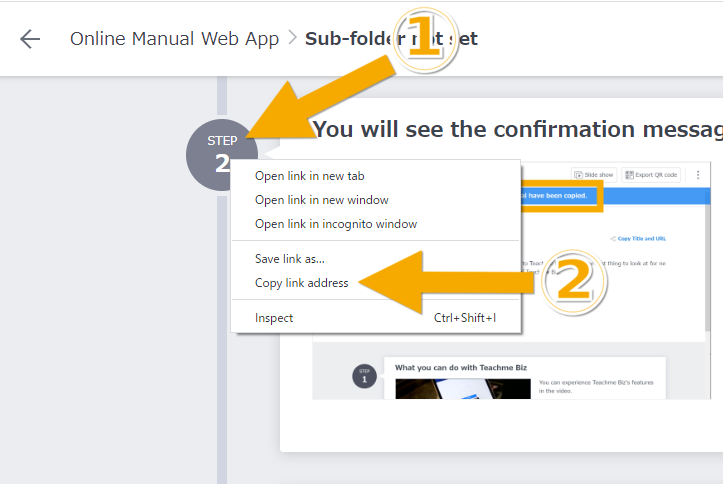
Navigate to a specific step from outside the manual
By copying the link address of the relevant step, you can obtain a URL that displays the specified step from outside the manual as well.
When using it within a manual, paste the copied URL into the description or register it as an external link.
※Since the URL contains a step-specific ID, you can jump to the same step even if the step number changes due to manual editing.
▼Copy URL to jump to a specific step of the manual (Web Browser)https://teachme.jp/8/manuals/8557937
Related:Add link to manual (Web Browser)
https://teachme.jp/8/manuals/8733762